Werocas Keynote Template: A Designer's Solution for Impactful Presentations
In the professional world, a presentation is more than just information transfer; it’s an experience. The design, flow, and visual coherence of your slides directly influence how your audience perceives your message and, ultimately, your credibility. Yet, creating such an experience from scratch is a significant challenge. It demands hours of design work, a deep understanding of visual hierarchy, and consistency across dozens of slides. For many professionals—entrepreneurs, marketers, educators, and corporate teams—this design burden often distracts from the core task: crafting a powerful narrative. This is precisely where the Werocas Keynote Template becomes not just a tool, but a strategic partner.
Beyond a Simple Template: Addressing Core Presentation Challenges
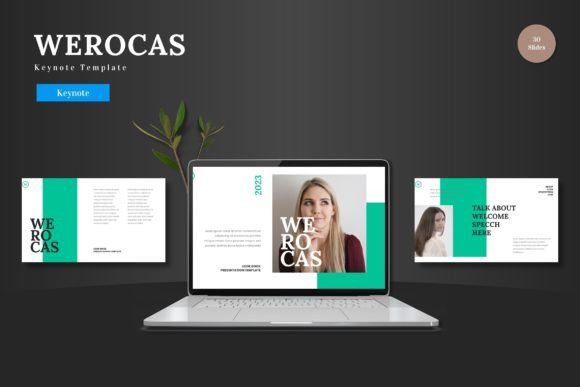
The Werocas Keynote Template is a comprehensive, professionally crafted design system for Apple Keynote. It is engineered to solve the fundamental problems that plague presentation creation. Its purpose is not merely to offer a few pretty slides, but to provide a complete framework that ensures visual harmony and narrative strength, allowing you to focus entirely on your content and delivery.
Common challenges include maintaining a consistent look across a long deck, integrating data visually without clutter, adapting the presentation to different brand colors, and ensuring every slide feels purposeful and connected. Without a structured template, presentations can become a patchwork of mismatched styles, undermining professionalism. The Werocas Keynote Template directly addresses these issues by being built on a robust system of Master Slides. This means every element—from text boxes to image placeholders—follows a unified design logic. When you customize one master element, the change cascades throughout related slides, guaranteeing cohesion effortlessly.
How Werocas Transforms Your Presentation Process
Imagine starting a critical project proposal, sales pitch, or annual report presentation. Instead of staring at a blank canvas, you open the Werocas Keynote Template and find 150 total slides thoughtfully organized into sections. This structure immediately provides a narrative roadmap. The inclusion of dedicated Section Break Slides helps you segment your story logically, guiding your audience through chapters of your message without abrupt transitions.
A key feature is the 5 premade color variations. Every professional knows that color psychology and brand alignment are vital. With Werocas, you aren’t locked into one palette. You can switch the entire aesthetic of your presentation to match a corporate identity, a project theme, or even the mood of your message—all with a few clicks, thanks to the coordinated color schemes embedded in the template. This flexibility is crucial for users who present to diverse audiences or manage multiple brands.
The template includes 30 unique slides for each core template section, offering a vast library of layout options for different content types. Whether you need to showcase a portfolio with the dedicated gallery slides, present complex data with handcrafted infographics, or highlight team members with elegant profile layouts, Werocas has a designed solution. The pixel-perfect illustrations and resizable, editable graphics ensure that your visuals are sharp and adaptable without requiring advanced design skills. Simply drag and drop your photos into the picture placeholders, and the design framework ensures they look integrated and professional.
Practical Applications and Real-World Outcomes
The utility of the Werocas Keynote Template shines across various scenarios. For a startup founder pitching to investors, the template provides the polished, confident aesthetic needed to build trust. The infographic slides can transform financial projections and market data into clear, compelling visuals that enhance understanding. For a marketing team presenting a new campaign, the portfolio and gallery slides offer perfect stages for showcasing creative assets and campaign mock-ups in a cohesive story.
Educators and trainers can leverage the structured sections to build progressive learning modules, using the clean layouts to keep instructional content focused and engaging. Corporate teams preparing internal reports can use the template to ensure departmental presentations maintain a unified company look, reinforcing brand culture internally. The outcome in each case is a presentation that feels deliberate, professional, and visually engaging, leading to greater audience retention and a stronger lasting impression.
Tailoring Werocas to Different User Needs
While the template is powerful for all users, its application can be approached differently based on expertise and need. A design novice can use the Werocas Keynote Template essentially "as-is," relying on the pre-built layouts and color schemes to produce a high-quality presentation quickly. The drag-and-drop functionality and clear placeholders make this process intuitive.
A more advanced user or a brand manager, however, can delve deeper into the system. They can exploit the Master Slide foundation to create custom variations that adhere to stricter brand guidelines, or combine elements from different color schemes to create a unique hybrid. The fact that all graphics are resizable and editable means they can be fine-tuned to match specific iconography or tweaked to better fit a particular data set in the infographics.
For teams, the main file inclusion—5 Keynote items with 30 slides and 5 color schemes—serves as a single, shared resource. This ensures everyone in the organization is working from the same design baseline, eliminating inconsistencies when presentations from different departments are compiled or presented together. The provided Readme file and font and photo information act as central guidance, streamlining collaboration.
Implementing Werocas for Maximum Impact
To get the best results from the Werocas Keynote Template, start by reviewing the entire slide library. Understand the scope of layouts available before you begin writing your content. This allows you to match your message to the most effective visual structure. Choose your color variation early to set the tonal direction of your presentation. Use the Section Break Slides deliberately to pace your narrative and give your audience mental resting points.
When working with data, prioritize the handcrafted infographic slides. They are designed to communicate statistics and relationships clearly, so lean on them instead of defaulting to simple bullet lists for numbers. For any visual content, utilize the picture placeholders rigorously; they are dimensioned and styled to ensure your images complement the design, not clash with it.
Remember that the Werocas Keynote Template is a foundation. Its strength is in its completeness and coherence, but your unique content and story bring it to life. By offloading the complex design work to this template, you free your mental resources to focus on rehearsal, audience engagement, and delivering your message with confidence. The final result is a presentation where every slide feels intentional, where design supports substance, and where you leave a definitive, lasting mark on your audience—the ultimate goal of any professional communicator.