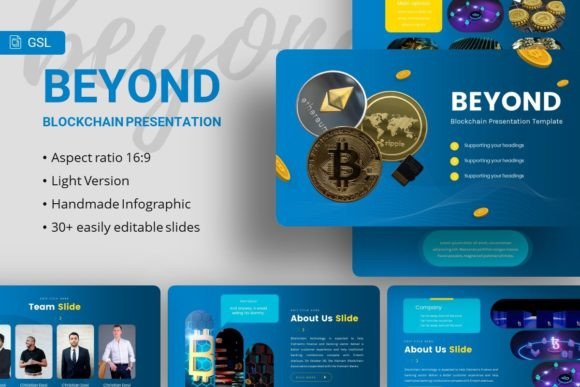
Beyond Google Slides: How a Presentation Template Can Transform Your Communication
When it comes to crafting presentations, Google Slides offers a robust and accessible platform. Its collaborative nature and ease of use make it a go‑to choice for many businesses and individuals. However, the challenge often lies not in the software itself, but in the time and design expertise required to create a visually compelling, professional deck. This is where the concept of a specialized presentation template enters the picture. One such option is the Google Slides – Beyond template, which represents a move towards pre‑structured, high‑quality design frameworks built specifically for the Google ecosystem.
What Makes a Template Distinct?
Unlike starting from a blank slate or using basic built‑in themes, a comprehensive template like Google Slides – Beyond is built as a complete system. Its value proposition centers on providing a foundation that is both aesthetically polished and functionally flexible. The 35 slides included in the deck are not random pages; they are a curated sequence designed to cover a wide array of presentation needs, from company introductions and team profiles to project portfolios and data‑driven pitch decks.
The distinction lies in the depth of design work already embedded into the file. Handcrafted infographics, pixel‑perfect illustrations, and master slide layouts mean that the user is adopting a cohesive visual language. The easy customizable contents and resizable, editable graphics allow for adaptation without breaking the overall design harmony. This balance between structure and flexibility is a key differentiator from simply picking a free online theme.
Strengths and Core Use Cases
The practical strengths of a template like Google Slides – Beyond are most apparent in specific scenarios. For individuals or teams without dedicated graphic design resources, it dramatically reduces the time from concept to finished presentation. The inclusion of placeholder elements for drag‑and‑drop image insertion—with sourcing suggestions from platforms like Unsplash, Pixabay, and Pexels—guides users towards professional visual content without the hassle of searching for correctly sized assets.
When It May Be the Right Choice
- Consistency Under Pressure: When you need to produce a polished deck quickly for a client meeting, investor pitch, or conference, the pre‑built structure ensures a professional outcome even under tight deadlines.
- Brand Alignment for Smaller Entities: Creative agencies, startups, or freelancers can use the template to establish a clean, modern visual brand in their communications without the cost of custom design.
- Multi‑Purpose Needs: As the template is suggested for company profiles, portfolios, photography showcases, and business presentations, it suits users who require one versatile tool for various communication purposes.
- Collaborative Projects: Since it’s built for Google Slides, it retains all the collaborative benefits of the platform—real‑time editing, commenting, and sharing—while elevating the shared visual standard.
Understanding the Tradeoffs and Limitations
While a premium template offers clear advantages, it is not a universal solution. One tradeoff is the inherent design direction. The chosen fonts (Poppins and Karla in this case), color palettes, and illustration style define a specific look. If your organization has a strict, existing brand guideline that clashes with this aesthetic, significant modification would be needed, which might undermine the efficiency gained.
Another consideration is the learning curve of customization. While content is described as easy to customize, working within master slides and editing vector graphics requires a basic familiarity with Google Slides’ more advanced features. A user seeking only to change text might find it effortless, but altering complex infographic layouts could present a challenge.
Furthermore, the value proposition hinges on the quality of the included design elements. The promise of handcrafted infographics and pixel‑perfect illustrations must be validated by the user’s own design standards. For some, it will be a perfect fit; for others with very niche or technical presentation needs (such as deep scientific data visualization), the template might serve only as a partial starting point, requiring supplemental custom slides.
Comparing to Other Approaches and Formats
To make an informed decision, it’s helpful to compare using a comprehensive template like Google Slides – Beyond to other common approaches.
Starting from Scratch: This offers total creative control but demands considerable time and skill. For non‑designers, the result often lacks the polish and structural flow a professional template provides. The template approach sacrifices some control for gained efficiency and guaranteed baseline quality.
Using Free Built‑in Themes: Most presentation software, including Google Slides, offers default themes. These are often simple and can feel generic. A premium template typically provides a more unique, contemporary, and extensive set of layouts, moving beyond the standard title‑and‑bullet‑point format.
Commissioning Custom Design: Hiring a designer yields a presentation perfectly tailored to your brand and message. It is, however, the most costly and time‑consuming path. A high‑quality template sits as a middle‑ground solution, offering a significant elevation in design at a fraction of the cost and time of a custom project.
Using Template Marketplaces: The broader ecosystem of presentation templates varies wildly in quality and depth. Some offer only a handful of slides with basic formatting. Google Slides – Beyond, with its 35 slides, detailed infographics, and focus on master slide coherence, appears positioned as a more comprehensive package within that marketplace, aimed at users who need a full deck, not just a few nice slides.
Decision Factors for Potential Users
When evaluating whether this template is the right resource for your next project, consider these practical questions:
- Time vs. Customization: How urgent is the need? How much customization do you truly require? If speed and a professional look are priorities, the template favors you.
- Design Skill Level: Are you comfortable editing pre‑set layouts and graphics? If not, assess whether the template’s default look aligns closely enough with your needs to use it mostly “as‑is.”
- Presentation Scope: Does your upcoming presentation fit the outlined use cases—corporate, portfolio, startup pitch, personal portfolio? Or is it a highly specialized technical report? The former scenarios represent a strong fit.
- Collaboration Needs: Will you be co‑creating this presentation with a team? The Google Slides format facilitates this, making it a strong option for collaborative workflows seeking a design upgrade.
Moving Beyond a Single Presentation
A significant, often overlooked benefit of adopting a robust template system is the potential for long‑term consistency. Once a team learns to customize and use the Google Slides – Beyond template effectively, it can become a reusable asset for future projects. This creates a cohesive visual identity across multiple presentations, strengthening brand recognition and professional perception over time. It turns a one‑off purchase into an ongoing communication resource.
Ultimately, tools like the Google Slides – Beyond template exist to solve a very practical problem: bridging the gap between accessible presentation software and high‑quality visual design. They empower users to communicate their ideas with greater impact without requiring them to become expert designers. By understanding its strengths in efficiency and polished structure, as well as its tradeoffs in creative direction and customization complexity, you can better assess if it is the right tool to elevate your next presentation, or if your specific needs point towards a different path.