Evaluating Presentation Design Templates: A Closer Look at the Damera PowerPoint Template
In a professional environment where clarity and visual impact are paramount, the tool you choose to build your presentations can significantly influence your message's reception. PowerPoint templates are a common solution, offering a structured starting point to save time and ensure design consistency. Among the many options available, the Damera PowerPoint Template presents itself as a comprehensive package designed for those who need to share complex ideas with confidence. Understanding its specific features, structure, and ideal application scenarios is crucial for anyone comparing presentation resources.
What Is the Damera PowerPoint Template?
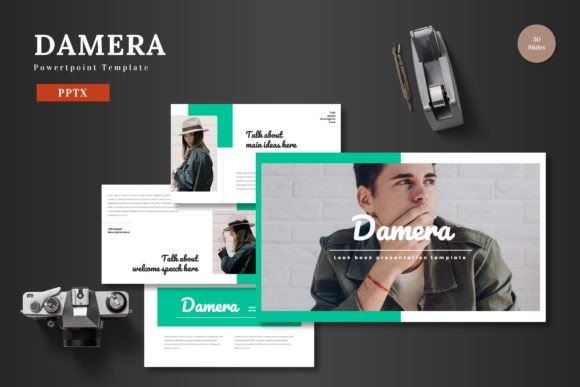
The Damera PowerPoint Template is a pre-designed slide deck comprising 150 total slides distributed across five distinct premade color schemes. Each color variation contains 30 slides, providing a substantial library of layouts. The template is built on master slides, ensuring consistent formatting, and includes specialized sections like break slides, a gallery, and portfolio slides. Its hallmark is a focus on "visually stunning slides that combine data, graphics, and impactful content," facilitated by handcrafted infographics and pixel-perfect illustrations. All graphical elements are resizable and editable, and the template utilizes picture placeholder functionality with drag-and-drop ease. The main package includes the primary PPTX files, with documentation covering fonts and photo information.
Distinctive Features and Core Design Philosophy
The design approach of the Damera PowerPoint Template distinguishes it from more basic thematic templates. It is engineered not just for aesthetic appeal but for substantive communication. The inclusion of 150 slides suggests a template aimed at detailed, multi-section presentations, such as business reports, product launches, or comprehensive project reviews. The five color variations offer flexibility to align with different brand identities or presentation tones without needing to redesign the entire deck.
A key strength is its built-in infographic library. Unlike templates that offer simple charts, handcrafted infographics are designed to visualize data relationships and processes in a more engaging, digestible manner. This can be particularly valuable when presenting market analyses, operational workflows, or research findings. The claim of "pixel-perfect illustrations" indicates attention to graphic detail, which helps maintain professional credibility on high-resolution displays. The resizable and editable nature of all graphics is a practical feature, allowing users to adapt icons and diagrams to their specific content without breaking the visual harmony.
Structural Advantages for the Presenter
The template's architecture, based on master slides, is a significant efficiency feature. Changes to a master slide—like adjusting a company logo position or a footer font—propagate across all slides using that master, ensuring global consistency and saving considerable manual adjustment time. Sections like the dedicated gallery and portfolio slides are tailored for specific use cases, such as showcasing product images or team accomplishments, which might otherwise require custom slide creation in a simpler template.
Practical Comparisons and Situational Fit
When evaluating the Damera PowerPoint Template against the broader universe of presentation tools, it's helpful to consider categories. On one end are fully blank canvases and PowerPoint's default themes, offering total freedom but requiring significant design skill and time. On the other end are highly specialized, single-purpose templates for niches like academic posters or real estate listings. Damera occupies a middle ground: a versatile, content-rich template for general business and professional communication that still requires user content input.
A common alternative is templates with significantly fewer slides. A 50-slide template might suffice for a shorter pitch, but for a longer, data-heavy presentation, constantly repurposing and duplicating a limited set of layouts can become tedious and lead to visual repetition. The depth of the Damera PowerPoint Template mitigates this. Conversely, some premium suites offer thousands of slides and integrated animation libraries. These can be overwhelming for users who need a cohesive, straightforward deck and may include complex elements that are difficult to customize. Damera's 150 slides strike a balance between variety and manageability.
Trade-offs and Considerations
The primary trade-off with any robust template like Damera is the learning curve and potential for over-complexity. A new user must familiarize themselves with the five color schemes, the master slide structure, and the infographic set to use the template effectively. For someone needing to create a simple 10-slide update for an internal meeting, this investment might not be justified. The template's strength in data visualization also implies its core audience: presenters who regularly need to explain metrics, processes, or concepts graphically. If your presentations are predominantly text-based narrative or simple bullet-point lists, many of Damera's featured assets may be underutilized.
Another consideration is customization depth. While graphics are resizable and editable, altering the fundamental layout structures or color schemes beyond the five provided would require advanced PowerPoint skills. The template offers flexibility within its framework, but it is not a design system for creating entirely new visual languages. This makes it a superb choice for organizations or individuals who want a strong, professional baseline but do not have in-house graphic designers.
When the Damera PowerPoint Template Is the Right Choice
This template is likely an excellent fit for several realistic scenarios. A corporate communications team preparing the quarterly executive briefing, which requires financial data charts, project timeline infographics, and portfolio highlights, would find the structured slides highly efficient. An independent consultant pitching services to potential clients could use the varied layouts to create a polished, credible presentation without hiring a designer. A university researcher presenting complex study results at a conference could leverage the infographics to make abstract data more accessible to the audience.
The Damera PowerPoint Template is also suited for situations where consistency across multiple presentations from different team members is vital. Using the same master slide-based template ensures that all departmental presentations maintain a unified look, reinforcing brand identity. The five color variations allow for subtle differentiation between, for example, a marketing presentation and a technical one, while keeping the underlying structure identical.
When Another Option Might Be Necessary
Despite its versatility, the Damera PowerPoint Template may not be the optimal tool in every circumstance. If your primary need is for highly interactive, animation-driven presentations akin to a keynote address, templates focused on dynamic transitions and cinematic visuals might be more appropriate. Similarly, for presentations that must be created and edited collaboratively in real-time on web-based platforms like Google Slides, a native PowerPoint template would require conversion and might lose some proprietary features.
Individuals or small teams with extremely limited time for *any* template setup might prefer even more streamlined options. Some services offer drag-and-drop online editors with pre-built slide blocks, which can be faster for absolute beginners than navigating a large PowerPoint file. Furthermore, if the specific aesthetic of Damera—implied by its focus on "visually stunning" and "handcrafted" elements—does not align with your organization's minimalist or ultra-modern brand guideline, seeking a template with a different design sensibility would be prudent.
Making an Informed Decision
The decision to use a template like Damera hinges on a few key factors. First, assess the typical length and content density of your presentations. Do you regularly need more than 30 slides? Do you frequently present data that requires visualization? Second, consider your team's design capability and time constraints. Does the template offer enough ready-to-use material to offset a lack of design skills? Third, evaluate the need for consistency versus customization. Does your organization require a standardized look, or is every presentation a unique creative project?
By weighing these factors, you can determine if the Damera PowerPoint Template's combination of volume, structured design, and data-visualization assets aligns with your communication needs. It stands as a substantial, professional resource for those who present complex information and value visual impact alongside content depth. For simpler, faster, or more stylistically divergent tasks, the broader market of presentation tools offers viable alternatives. The ultimate goal is selecting a resource that empowers you to share your ideas with clarity and confidence, minimizing technical hurdles while maximizing the power of your message.