The Munirom PowerPoint Template: A Framework for Efficient and Professional Presentation Design
For professionals tasked with communicating ideas—whether to clients, investors, teams, or students—the creation of a presentation is a significant workflow step. It is not merely an artistic task but a process of distillation, organization, and persuasion. The Munirom PowerPoint Template enters this process as a structured foundation, designed to accelerate the production phase while ensuring a high standard of visual coherence. Its value lies not in being a finished product, but in being an editable system that integrates directly into the familiar environment of PowerPoint, eliminating the friction often associated with using external design software.
Where Munirom Fits in Your Presentation Workflow
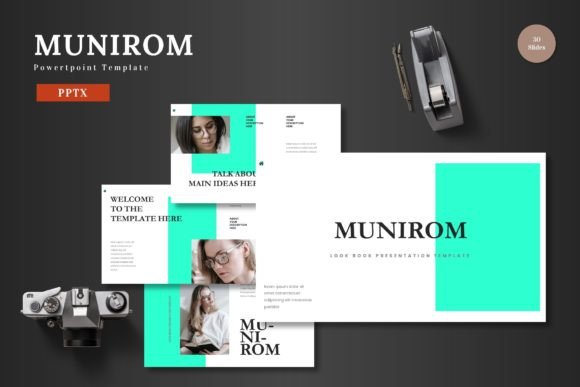
Typically, presentation development follows a sequence: conceptual planning, content drafting, visual design, and final refinement. Introducing a template like Munirom at the outset of the visual design phase can dramatically reshape this workflow. Instead of starting from a blank slide—a process that consumes time on layout decisions, color palette selection, and graphic sourcing—you begin with a fully-realized visual framework. This allows you to channel your effort immediately into the core task: adapting the template to carry your specific message. The 150 total slides, organized across five premade color schemes, provide a library of pre-designed layouts for almost any content type, from team introductions to complex data visualization.
Preparation and Initial Integration
The first practical step is assessing your project's needs against the template's structure. Before opening PowerPoint, review your content outline. Identify key sections that require distinct slide types: a title slide, agenda, portfolio showcase, statistical breakdown, or concluding call to action. Munirom’s inclusion of section break slides and a master slide-based design aids this preparatory organization. You are effectively mapping your narrative onto its pre-built architecture. Upon opening the main PPTX file, you select one of the five color variations that best aligns with your brand identity or presentation tone. This initial choice establishes visual consistency for the entire project, a critical factor in professional quality control.
Interaction with Core Content and Assets
The true integration occurs when you begin replacing placeholder content with your own. The template's design philosophy emphasizes editable everything. Every graphic element, from the pixel-perfect illustrations to the handcrafted infographics, is resizable and editable directly within PowerPoint. This is a pivotal feature for workflow efficiency. You do not need to export elements to another program like Illustrator or Photoshop to tweak a color or adjust a shape. For image integration, the picture placeholder system allows a simple drag-and-drop operation. This seamless interaction means your primary assets—your text, data charts, logos, and photographs—become the focal point, while the template provides a polished, scalable container.
Consider a common scenario: a marketing professional preparing a product launch pitch deck. They have a product logo, a set of key features, market analysis graphs, and portfolio images. Using Munirom, they can dedicate one slide to a dynamic gallery layout for the portfolio, another to a clear infographic for the feature list, and a third to a minimalist slide for the data graphs. The color scheme, chosen at the start, ensures all these disparate elements feel part of a single, cohesive story. The process becomes content-centric, not design-centric.
Maintaining Quality and Consistency During Editing
A major risk in rapid presentation building is visual inconsistency—font sizes that vary, misaligned elements, or color usage that drifts. Munirom’s foundation on master slides mitigates this. Changes made to the master slide—such as adjusting the default font or modifying a footer style—propagate throughout the slides using that master. This built-in systematic control is invaluable for long presentations and for teams where multiple people might be editing different sections. It ensures that even under tight deadlines, the output maintains a uniform, professional appearance. Furthermore, the template includes animated slides, which can be implemented without any specialized animation knowledge. Integrating these at key points in your presentation can enhance narrative flow, but they remain fully editable so you can control the timing and emphasis to suit your delivery.
Practical Implementation Across Different Use Cases
The multipurpose nature of the Munirom PowerPoint Template makes it suitable for integration into diverse professional and personal workflows. Its application is defined not by a specific industry, but by the common need for clear visual communication.
- Business and Pitch Deck Processes: For entrepreneurs and startups, the pitch deck creation process is often iterative and time-pressured. Munirom provides a ready-made structure that aligns with common pitch expectations: problem statement, solution, market size, business model, and team. Using the template, founders can rapidly produce a visually compelling deck that feels investor-ready, allowing them to focus on refining their narrative and financial models.
- E-commerce and Product Promotion: Marketers creating presentations for internal sales teams or external retailer meetings need to showcase products effectively. The gallery and portfolio slides are directly applicable here. The workflow involves dragging product photos into the placeholder layouts and using the infographic slides to highlight key selling points or promotional campaign statistics.
- Educational and Training Material Development: Educators and corporate trainers developing course materials or workshop slides benefit from the template’s organization. The section break slides help segment modules or chapters, and the variety of layouts accommodates different teaching methods: theory slides, example case studies, and quiz or question formats. The entire package can be adapted for a consistent course branding.
- Freelancer and Small Business Operational Use: For freelancers and small business owners, who often manage multiple roles, efficiency is paramount. Using a comprehensive template like Munirom for all client presentations, internal reports, and proposal documents creates a recognizable brand identity and saves considerable time per project. The included readme file and font information ensure that even non-designers can correctly implement and customize the template.
Long-Term Use and Template Adaptation
Integrating Munirom into your regular workflow invites consideration for long-term use. Rather than being a one-off solution, it can become a standard part of your presentation toolkit. After initial use, you might save a customized version—with your company logo embedded in the master slide and your corporate colors applied—as your organization’s default presentation base. This promotes not only efficiency but also brand consistency across all communications produced by different departments or team members. The fact that all elements are editable means the template is not static; as your needs evolve, you can modify the infographics or create new slide layouts based on the existing masters, extending its usefulness over many projects and years.
Final Stages: Presenting and Sharing Your Work
The culmination of the workflow is the presentation itself. Having built your slides within the Munirom framework, you are assured of a clean, scalable, and colorful visual backdrop for your content. The design supports your delivery rather than distracting from it. For sharing, the output is a standard PowerPoint file (PPTX), ensuring compatibility with virtually any system or platform where the presentation might be viewed or presented. There are no proprietary formats or dependencies on additional software. This smooths the final step in the process, from rehearsal to live delivery to distributing the file to stakeholders. The template, in essence, handles the visual heavy lifting, allowing you to concentrate on the message, the data, and the engagement with your audience—the true goals of any presentation process.
In summary, the Munirom PowerPoint Template is a practical tool for integration into a content-driven workflow. It intervenes at the point where ideas require visual structure, providing a comprehensive, editable system that reduces design overhead, enforces consistency, and adapts to a wide array of professional scenarios. Its utility is measured not just in the time saved during creation, but in the quality and coherence maintained in the final output, enabling communicators to present their work to the world with confidence and clarity.