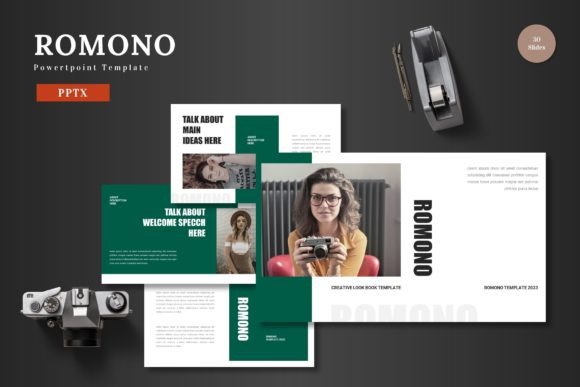
Evaluating Romono: A PowerPoint Template for Modern Presentations
In the landscape of professional communication, the quality of a presentation can significantly influence how ideas are received. For individuals and teams tasked with creating impactful slides, the choice of a template is a foundational decision. The Romono PowerPoint template presents itself as a comprehensive design system aimed at users who need to share complex information with clarity and visual appeal. This analysis examines its distinct characteristics, practical applications, and the tradeoffs involved in selecting such a resource.
The Core Design Philosophy of Romono
Romono is not merely a collection of slide backgrounds; it is a structured framework built around the principle of data visualization paired with impactful content. Its proposition is to provide users with a tool to build confidence through design, enabling the creation of visually stunning slides that integrate graphics, statistics, and narrative seamlessly. The template’s distinctiveness lies in its holistic approach. It offers 150 total slides organized across 5 premade color schemes, providing 30 slides for each variant. This structure suggests a focus on versatility and thematic consistency, allowing a user to maintain a coherent visual identity throughout a lengthy presentation while having ample layout choices.
From a practical standpoint, the inclusion of features like section break slides, handcrafted infographics based on master slides, and pixel-perfect illustrations indicates a focus on professional polish. The promise that all graphics are resizable and editable, coupled with drag-and-drop picture placeholder functionality, addresses a common pain point: the need for adaptability without requiring advanced design software skills. The inclusion of dedicated gallery and portfolio slides further tailors the template towards use cases such as showcasing projects, products, or creative work.
Comparing Template Approaches: Flexibility versus Structure
When evaluating presentation tools, users often face a choice between highly structured, pre-designed systems like Romono and more open-ended alternatives. Other common categories include minimalist single-color templates, subscription-based online slide builders, or even starting from a completely blank canvas. Each approach carries different implications for time, creative control, and final output.
The Romono PowerPoint template occupies a specific niche. It provides considerable structure—with 150 pre-built slides—but within that framework offers customization through five color variations and editable elements. This contrasts with minimalist templates that might offer only 20-30 slides, requiring the user to create many layouts themselves. For a professional who needs to produce a polished, data-heavy presentation under time constraints, Romono’s breadth can be a significant efficiency gain. The master slide system ensures that changes to fonts or core colors propagate globally, maintaining design integrity effortlessly.
However, this structured abundance also presents a potential tradeoff. Users with a very specific, unconventional aesthetic vision might find the predefined layouts and color palettes constraining. While elements are editable, fundamentally altering the core design philosophy of the template would require more work than starting from a simpler base. Therefore, Romono appears best suited for users whose priority is professional clarity and visual impact within established design conventions, rather than avant-garde artistic expression.
Key Decision Factors: Assessing Your Needs
Determining if the Romono PowerPoint template is the right choice involves evaluating several key project and personal factors.
- Project Scale and Complexity: For presentations exceeding 30 slides or those integrating multiple data types (charts, infographics, portfolios), Romono’s volume of slides and dedicated layouts can prevent repetitive design work. A simpler template might suffice for a brief, straightforward talk.
- Design Skill and Time Available: The template’s claim of “easy-to-use features” and drag-and-drop placeholders targets users with intermediate or limited PowerPoint expertise. If you possess advanced graphic design skills and enjoy building slides from scratch, you might not utilize the full value of the pre-built system.
- Branding and Color Requirements: The five included color schemes offer a range, but if your organization or project requires adherence to a very specific color palette not covered by these schemes, you will need to undertake manual color replacement across many elements—a non-trivial task.
- Output Expectations: If the presentation’s success critically depends on a high-polish, corporate-standard visual appeal—such as for investor pitches, client proposals, or conference keynotes—the handcrafted infographics and pixel-perfect assets in Romono provide a quality floor that can be hard to achieve independently.
Realistic Use Cases and Potential Limitations
Consider a marketing team preparing a quarterly review. The presentation needs to contain performance data charts, competitor analysis infographics, project portfolio images, and future strategy slides. Romono’s offering directly maps to these needs: its infographics can visualize data, its gallery slides can showcase projects, and its section breaks can organize the review into distinct parts. The availability of five colors allows the team to choose a scheme that aligns with their company’s seasonal campaign theme.
Conversely, imagine an academic researcher presenting a highly specialized scientific finding. While Romono’s data slides are useful, the template’s overall aesthetic might be perceived as too corporate or generic for a scholarly conference where a more subdued, citation-focused template is customary. Furthermore, if the research requires unique, complex diagramming not covered by the handcrafted infographics, the researcher would still need to create those custom visuals outside the template’s framework.
A practical limitation to note is the dependency on PowerPoint itself. The Romono template includes the main file as a PPTX format. This is ideal for users deeply embedded in the Microsoft ecosystem. However, teams that collaborate using alternative software like Google Slides or Apple Keynote would need to convert the file, a process that often breaks advanced animations and master slide linkages, diminishing the template’s value.
When Romono Is a Strong Fit
The Romono PowerPoint template is likely a compelling option when several conditions align. It fits well for business professionals, consultants, educators creating course materials, and in-house corporate communicators who regularly produce internal or external presentations. Its strength is in standardizing quality and reducing the time from concept to finished slides. If your workflow involves frequently updating a core presentation with new data or images, the resizable graphics and easy picture replacement features can streamline those iterations.
The inclusion of a “Readme” file with font and photo information is a signifier of a professional product aimed at users who care about licensing and proper attribution, which is often a requirement in commercial and educational settings.
When Another Approach Might Be Necessary
There are scenarios where users might need to look beyond Romono or similar comprehensive templates. If budgetary constraints are severe and free templates are the only option, Romono’s paid status makes it inaccessible. For presentations demanding absolute minimalist design—where every element is purposefully sparse—the rich, graphic-heavy nature of Romono might conflict with that goal. Additionally, as mentioned, users locked into non-Powerpoint presentation platforms will find its utility limited.
Finally, for projects requiring a one-off, highly unique artistic presentation (like a fashion show backdrop or an art exhibition guide), the time investment might be better spent on custom design or hiring a graphic designer, rather than adapting a broadly-focused business template.
Making an Informed Selection
Choosing a presentation template is ultimately about matching a tool’s capabilities to your specific requirements for efficiency, control, and outcome. The Romono PowerPoint template offers a significant depth of resources aimed at creating confident, data-driven presentations. Its value proposition centers on providing a large library of professionally designed components that are customizable enough for most corporate and professional needs, yet structured enough to ensure consistency and save time.
By understanding its structured approach, its strengths in handling complex, multi-section presentations with varied content types, and its limitations regarding aesthetic rigidity and platform dependency, you can better assess its fit for your work. For many users exploring alternatives in the crowded space of presentation design resources, Romono represents a balanced option that prioritizes practical utility and visual impact, allowing the presenter’s ideas to take center stage supported by a solid design foundation.