Awore: The Multipurpose Powerpoint Template Suite
For anyone who regularly creates presentations, the process can quickly become tedious. Starting from a blank slide each time means you are constantly rebuilding basic layouts, formatting text boxes, and searching for cohesive design elements. This is where a robust Powerpoint template like Awore makes a significant difference. It is not just a set of slides; it’s a comprehensive, editable framework designed to accelerate and elevate your presentation workflow.
What Exactly is the Awore Powerpoint Template?
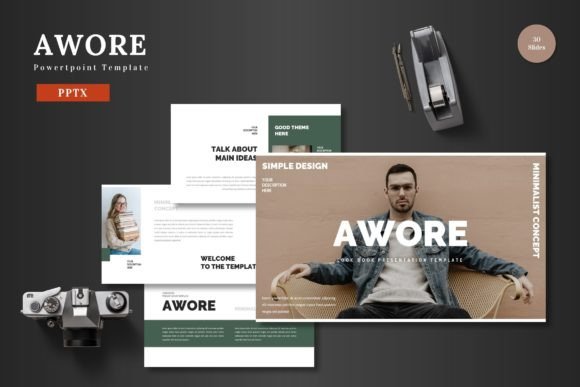
Think of Awore as a professional toolkit packaged within Powerpoint. It comprises 150 total slides, intelligently organized into five distinct color schemes. Each color variation contains 30 slides, giving you five complete presentation styles to choose from immediately. The core idea is multipurpose readiness: whether you need to deliver a business report, launch a product pitch, showcase an e-commerce site, or promote a service, Awore has structured slides to support your content.
Perhaps its most appealing characteristic is its commitment to simplicity within Powerpoint itself. The developer emphasizes that all elements are editable directly using Powerpoint’s native tools. There’s no requirement for additional software like Illustrator or Photoshop. Every shape, infographic, and illustration is crafted within Powerpoint using master slides, ensuring that you can resize graphics, change colors, and drag-and-drop your own images into placeholder areas without any technical hassle. This makes Awore particularly welcoming for beginners and casual users who want professional results without a steep learning curve.
The Core Value: Saving Time While Enhancing Quality
The primary problem Awore solves is the tension between speed and quality. As an entrepreneur rushing to prepare for an investor meeting, or a marketer needing a last-minute campaign review deck, you often sacrifice design polish for timeliness. Conversely, spending hours on custom design can drain resources. Awore bridges this gap by offering a “clean, scalable, colorful, and multipurpose” foundation.
Because the template is based on master slides, applying global changes is straightforward. If you decide to switch the entire presentation from a blue theme to a green one, or adjust the font consistency across all slides, you can do so efficiently. This scalability ensures that whether your presentation grows to 10 slides or 50, the design remains coherent and professional. For individuals and small businesses, this maintains the perceived quality of your products and ideas, presenting them in a context that feels deliberate and polished.
Key Features That Support Real-World Use
Let’s break down some of the specific features that translate into practical benefits. The inclusion of handcrafted infographics means you have ready-made charts, diagrams, and process flows that you can simply populate with your data. The pixel-perfect illustrations add visual interest without requiring you to be an artist. For portfolio-driven professionals like freelancers or photographers, the dedicated gallery and portfolio slides are a boon—you can drag and drop your work into a pre-styled layout that already looks curated.
The package includes five separate PPTX files, each representing a color scheme, all in widescreen format. This is useful for adapting to different contexts or branding needs. One color scheme might feel perfect for a corporate financial update, while another brighter scheme could be ideal for a creative project pitch. Having animated slides included also adds a dynamic layer to your delivery without needing to learn complex animation techniques.
Who Can Benefit from Using Awore?
The appeal of Awore spans across a wide audience. Educators can use it to build engaging lecture materials that are visually structured. Bloggers and content creators might employ it for webinar presentations or online course slides. Professionals in sales, consulting, or management can rely on it for consistent internal and client reports.
Consider a small business owner preparing a pitch deck for a loan application. Using Awore, they can quickly assemble slides that cover their business model, market analysis, financial projections, and team overview, all within a design that communicates competence and credibility. A freelancer might use the portfolio slides to create a stunning capability presentation to send to potential clients, all within an hour of work. The multipurpose nature means the same template supports both the formal needs of a boardroom and the personal needs of an independent creator.
Important Considerations Before You Start
While Awore is designed to be intuitive, it’s wise to approach any new template with a little preparation. The files come with a “Readme First” document containing font and photo information. Taking a moment to review this ensures you have the recommended fonts installed for perfect typographic harmony. Also, spend some time exploring the master slides section of Powerpoint to understand how the template’s foundation works. This will empower you to make broader changes confidently.
Remember that a template is a starting point, not a finished product. Your content—the words, data, and images you input—is what makes it valuable. Awore provides the stage, but you are the performer. Don’t feel compelled to use every slide; often, selecting and adapting a subset from one of the five color schemes is the most efficient path.
From Editing to Presenting: A Streamlined Journey
The workflow with Awore is straightforward. You choose a color scheme PPTX file that suits your mood or brand. Open it, and begin inputting your content into the text areas. Replace the image placeholders with your own photographs or graphics via simple drag-and-drop. If you want to adjust a color accent, you can do so by selecting the shape and using Powerpoint’s format menu. Because all graphics are vector-based within Powerpoint, resizing them won’t reduce quality.
Finally, when your presentation is ready, you can utilize the included animated slide to add a touch of engagement during your delivery. Then, you’re set to present your slides to the world. This end-to-end process, contained within one familiar software environment, removes the friction that often accompanies presentation design. It allows you to focus your energy on the message itself, confident that the visual container is already handled.
In essence, the Awore Powerpoint Template suite is about reclaiming time and reducing design anxiety. It offers a structured, high-quality, and deeply editable canvas that responds to the real pressures faced by professionals, educators, entrepreneurs, and creatives every day. By providing variety through its five colors and depth through its 150 slides, it ensures you have a resource that can adapt not just to one project, but to many across your personal and professional landscape.